
Generic Grid: A Post Grid That Pages Itself Instead of Hiding the Rest
The Generic Grid turns any query into a paginated Elementor post grid: image, category, title, excerpt and a date badge, with real pagination. Free.

Every carousel widget puts its arrows in the same two places: floating over the slides, or centred underneath. That is fine until the design says otherwise. A magazine layout wants the arrows in the headline column, beside the section title. A product row wants the dots in the opposite corner. A full-bleed slider wants nothing on top of the image at all.
Remote carousel controls take the navigation out of the slider. Three separate widgets, each one a controller with no slides of its own, each pointing at a carousel somewhere else on the page. You place them like any other widget, in any column, and they drive the target.
They are Sky Addons Pro widgets, and they work with the carousels already in the plugin.

| Built-in slider arrows | Custom CSS to move them | Remote carousel controls | |
|---|---|---|---|
| Where they can go | Over or under the slides | Anywhere the parent allows | Anywhere on the page |
| Setup | Toggle | Positioning rules and testing | Place a widget, name the target |
| Survives a layout change | Yes | Rarely | Yes |
| Styling | The slider’s controls | Your rules | Full widget style tabs |
| Works across columns | No | No | Yes |
The middle column is what most people actually do, and it is the one that breaks. Absolute positioning pulled out of a slider is a rule that holds until the section gains a new row.
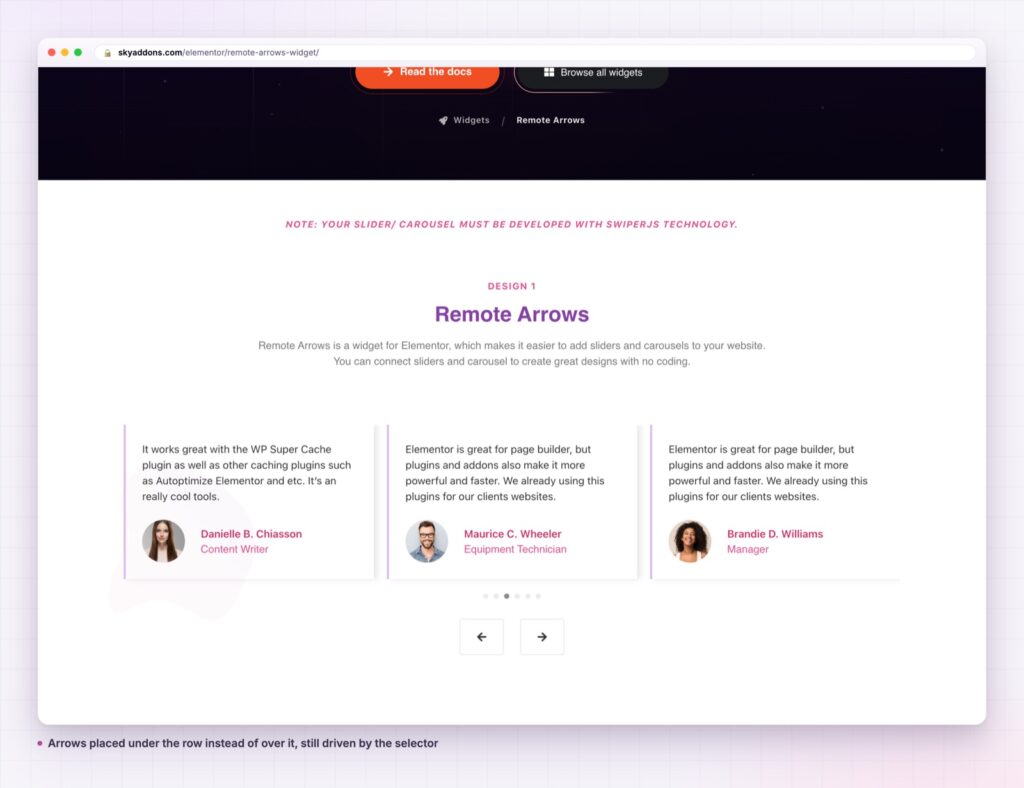
Three widgets, one model. Remote Arrows renders prev and next. Remote Pagination renders bullets or a fraction. Remote Thumbs renders a thumbnail strip. All three take a target and drive it.
The target is a selector. Point the controller at the carousel by its selector or carousel id, and the two are linked. Nothing has to be nested, adjacent or inside the same container.
Arrows carry text as well as icons. Prev and next take an icon each, plus optional text, so a controller can read “Previous story” rather than being a bare chevron. Both get their own hover animation.
Pagination is not just dots. Bullets or a fraction, with controls for bullet shape and spacing, so the same widget covers a dense set and a set of four.
Thumbs pull their images from the target. The thumbnail strip reads the slides of the carousel it drives, so there is no second gallery to keep in sync. It is its own small slider, linked through the library’s thumbnail mechanism.
Full style tabs, normal and hover. These are ordinary widgets, so the controller gets the same styling depth as a button rather than the handful of options a slider exposes for its own arrows.
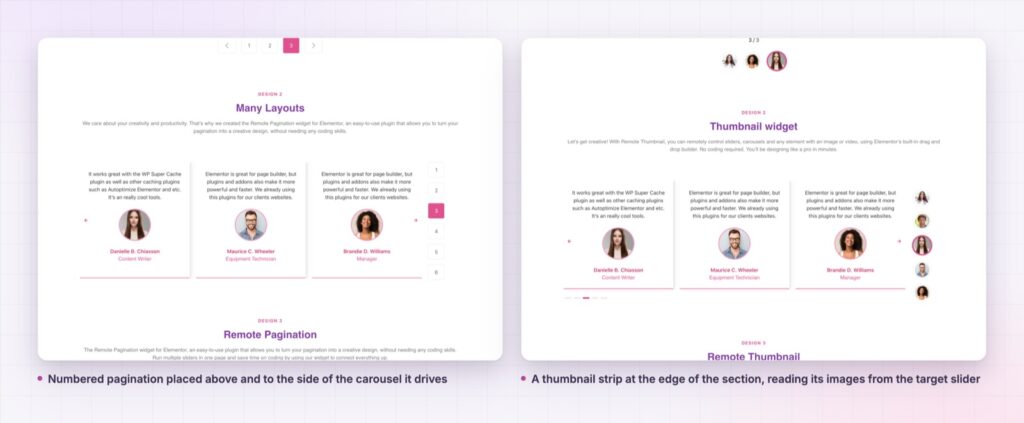
The controller is a pure controller. It renders links or bullets and hands the instruction to the slider through the Swiper API, which is the same mechanism the slider’s own arrows use. There is no duplicated slide data, no second copy of the content, and no synchronisation to maintain.
That is also why the pattern survives redesigns. Moving the arrows is moving a widget, which is a layout operation Elementor already understands, rather than a positioning rule that has to be re-derived every time the section changes.
The arrows belong where the reader’s eye already is. On most layouts that is not floating over the image.
Because the widgets are ordinary widgets, they inherit responsive visibility too: a thumbnail strip can be shown on desktop and hidden on a phone, where a row of small images is hard to hit accurately.
There is a second reason remote carousel controls are worth reaching for, and it is about how a section is read rather than how it is built. Arrows that float over a photograph compete with the photograph. Dots centred under a slider sit in the gap between two sections, where nothing else is happening and the eye has already moved on. Putting the control in the heading row, beside the title, places it where the reader is already looking when they decide whether the section is worth their time.
The three remote carousel controls widgets also make a section honest about what it holds. Remote pagination showing a fraction tells a visitor there are nine items before they click anything. A thumbnail strip goes further and shows them what the nine are. Both turn a carousel from something a visitor has to explore into something they can assess, which is the whole argument for taking the controls out of the slider in the first place.

The three widgets combine. A product gallery can take Remote Thumbs on the left as a vertical rail and Remote Arrows above the main image, leaving the carousel itself completely clean.
A sticky column is another good use. Put the controller in a sticky container beside a tall carousel and the navigation stays in reach while the slides scroll past, which is hard to do with controls that live inside the slider.
They also make an existing section better without a rebuild. A testimonial widget row gains a thumbnail strip of the speakers, and a showcase flow section can move its arrows up into the title row where there is already space for them.
No. The three remote carousel controls widgets are part of Sky Addons Pro. The carousels they drive include free ones, but the controllers themselves are Pro.
No. Elementor and Sky Addons Pro are enough. They drive the carousel widgets already in the plugin.
Barely. A controller renders a few links or bullets and calls the slider that is already on the page. There is no second set of slides and no extra query.
Yes. They are ordinary widgets, so they take the same responsive visibility and spacing controls as anything else, which is how a thumbnail strip gets hidden on a phone.
No. A controller points at one target. For two carousels, use two controllers, and make sure each target is uniquely identified.
Remote carousel controls are three Pro widgets that take a slider’s navigation out of the slider: arrows, pagination and a thumbnail strip, each placed anywhere on the page and pointed at a target by selector. The layout stops dictating where the controls go.
See them running on the Remote Arrows demo, the Remote Pagination demo and the Remote Thumbs demo, then read the Remote Arrows documentation. They are Pro widgets: see the split on the free versus Pro page, and the plans on pricing.




Comments are closed.