
Advanced Slider for Elementor: Hero Slides With Five Transitions, Free
A free advanced slider for Elementor: five transitions, nine content positions, video backgrounds and Elementor templates as slides, built on Swiper.

Hero sliders have a bad reputation and most of it is earned. The usual one autoplays too fast, carries three messages nobody asked for, and hides the only button that matters on slide three.
None of that is the slider’s fault. It is what happens when a hero gets used as a noticeboard. Used properly, a slider is the cheapest way to give a home page a full-bleed opening image with copy on top, and to change that image next month without rebuilding the section.
This one is free, built on Swiper, and exposes the controls that decide whether the section works: how it moves, where the copy sits, and what the visitor sees when nobody touches it.

| Approach | Content sources | Transitions | Video background | Cost |
|---|---|---|---|---|
| Static hero image | One, typed | None | No | Free |
| Theme slider | Usually posts | Theme decides | Rarely | Bundled |
| Premium slider plugin | Many | Many | Yes | Paid, and heavy |
| Advanced Slider | Custom, posts, ACF, templates | Five | Four types | Free |
The interesting column is the first. Slides can be typed by hand, pulled from posts, mapped from an ACF repeater, or made from an Elementor template, which means a slide can contain anything you can build in the editor.
Five transitions. Slide, fade, flip, cube and coverflow, with cross fade for the fade effect and rotate and shadow settings for coverflow. Slide and fade are the two that belong on a business hero; the other three are for pages where the slider is the feature.
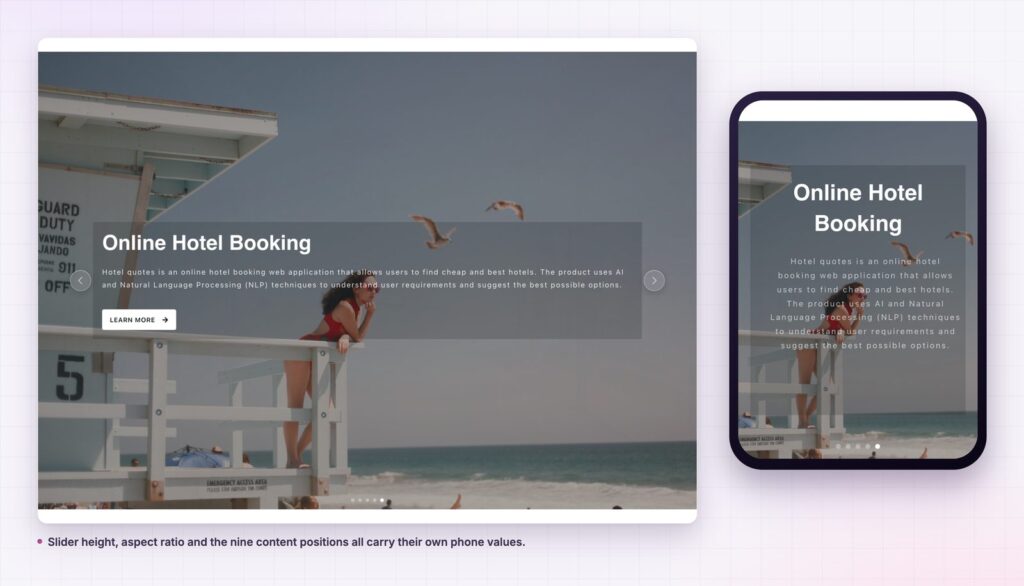
Nine content positions. Top, middle and bottom crossed with left, centre and right. Combined with the content box width control, that is enough to place the copy away from the busy part of an image instead of fighting it.
Video backgrounds. A slide can carry a YouTube, Vimeo, self-hosted or remote video behind the content, so a hero can move without a heavy image sequence.
Four content sources. The repeater, posts through the query builder, ACF fields with named mappings, or an Elementor template per slide. The last one turns the slider into a layout container rather than a picture frame.
Text effects per slide. None, default, left to right, top to bottom, or bottom to top, so copy can arrive with the slide rather than sitting there waiting.
The controls that matter for behaviour. Autoplay with a speed in seconds, loop, pause on hover, slide speed, direction, an observer setting for sliders inside hidden elements, and hash navigation for linking to a slide. Navigation icons and pagination style, including progress bar and dynamic bullets, are exposed too. It is built on Swiper, the same library that sits under most commercial sliders.

A hero has one job, which is to tell a stranger what this is and give them somewhere to go. A slider does that job well when every slide makes the same offer in a different picture, and badly when every slide makes a different offer.
The practical argument is maintenance. A hero built as a slider can be reshot, reworded and rescheduled by editing one widget, without touching the section, the container settings or the responsive values. On a site that runs campaigns, that is the difference between a fifteen-minute change and a rebuild.
Three slides that say the same thing in three photographs is a hero. Three slides that say three things is a noticeboard.
Observer exists for sliders that start life hidden: inside a tab, an accordion or an off-canvas panel. Without it, the slider measures a container with no width and renders as a stripe. Turning it on is the fix, and it is the single most common slider support question anywhere.
Hash navigation writes a fragment into the URL for the active slide, which means a campaign link can open the hero on the right slide. It is a small feature that solves a real problem when marketing wants to point at one message.
Cross fade, under the fade effect, decides whether slides dissolve into each other or hand over with a brief gap. On photographic heroes the dissolve almost always looks better, and it is off by default in most sliders that do not expose it at all.
Because a slide can be an Elementor template, the widget is not limited to pictures with text. A slide can hold a pricing table, a testimonial layout, a form, or a comparison block. That turns the slider into a way to page through complex content in a fixed space, which is useful on a landing page that would otherwise run long.
The posts source has a similar reach. Pull the latest three case studies, map the excerpt to the slide text, and the hero updates itself when the team publishes work. No editor has to remember to change the home page.

Most slider problems are content problems. The widget will happily run six slides; the question is whether slide two deserves to exist.
The test is simple. If slide two makes the same offer as slide one in a different photograph, keep it: the visitor who arrives mid-rotation gets the same message either way. If slide two makes a different offer, it is competing with slide one for the same second of attention, and one of them will lose.
That rules out the noticeboard hero, where marketing, recruitment and a seasonal promotion take a slide each. Those are three audiences, and a hero can only address one. The other two belong further down the page, where a visitor who scrolled has already shown what they came for.
Once the content is right, three settings decide how the section behaves. Autoplay speed should not be under five seconds; a slide that changes before the copy is read is worse than a static image. Pause on hover protects the visitor who stopped to read. Loop decides whether the hero returns to slide one or stops, and stopping is the honest choice when the slides are sequential rather than equivalent.
Keep the button in the same position on every slide, with the same label. A call to action that moves between slides asks the visitor to find it twice, and the second time they will not bother.
If the hero really does need to carry several distinct messages, the better structure is one static hero with a strong offer and a row of cards underneath. The slider is for one message told in several pictures, which is a different job and the one it does well.
Yes. It ships in the free Sky Addons plugin. Pro adds sliders such as Flow, Pace and Panel, and the free versus Pro page sets out the difference.
Yes. A slide can carry a YouTube, Vimeo, self-hosted or remote video as its background, with the content layer on top.
Yes, through the query builder, with the option to take the slide text from the excerpt or the content. ACF repeater fields can be mapped as well.
The container had no width when the slider measured itself. Turn on Observer and it re-measures when the element becomes visible.
Yes. Height, content position, box width and typography are all responsive, and the navigation arrows and pagination can be hidden per breakpoint.
An advanced slider gives a page a full-bleed hero that can be changed without rebuilding the section: five transitions, nine content positions, video backgrounds and four content sources, including Elementor templates as slides. Keep it to three slides that make the same offer, set pause on hover, and check the phone values before publishing.
See the advanced slider demo, read the Advanced Slider documentation, or compare plans on the pricing page. For a headline that moves inside a static hero, use the animated heading; for a scroll-driven section instead of a slider, see horizontal scroll.



Comments are closed.